- Marketplace
- For Businesses
Overview Business software for small teams, schools and nonprofits. Education The Education Kit for schools and colleges. Why Clouve How Clouve compares with your other options. Case study How an education institution moved its LMS and SIS. Trust & Security Hosting, backups, recovery targets and your data. Business docs Guides for running your apps on Clouve.
- For Developers
- Partners
- Pricing
- Log in
- Start free trial
Four ways to run business software, compared.
When a school, nonprofit or small team needs an LMS, a CRM or an ERP, it usually has four options. Each one suits someone. Here is how they differ, including when Clouve isn’t the right choice.
The four options
Side by side
On a phone, scroll the table sideways.
| Compared on | App maker’s hosting | Generic host, done yourself | Per-seat SaaS | Clouve |
|---|---|---|---|---|
| What you can run | One product. MoodleCloud runs Moodle LMS; Odoo.sh runs Odoo. | Anything you can install and maintain. | The vendor’s product. | Open-source apps such as Moodle, Gibbon, Odoo, SuiteCRM and WordPress, plus kits that connect them, like the Education Kit. |
| Who looks after it | The vendor runs the platform. MoodleCloud keeps sites on the latest Moodle and asks you to keep your own backups. Odoo.sh backs up production daily and keeps backups for up to 3 months. | Your team: upgrades, backups, security and fixes. | The vendor. | Clouve runs hosting, monitoring and routine maintenance. Paid plans add scheduled backups. On AI editions, the AI Assistant runs upgrades and diagnoses problems when you ask. |
| How pricing works | MoodleCloud: annual plans by number of users (up to 750) and storage. Odoo.sh: per worker, storage and staging environment, on top of an Odoo Enterprise subscription. | Server costs plus your team’s time. | Per user, per month. | Per app, by capacity tier, monthly. No per-user fees. WordPress starts at $62 a month on X-Small. |
| Customizing | MoodleCloud doesn’t allow your own plugins or themes. Odoo.sh works from your own GitHub repository and development branches. | Full control. | The vendor’s settings and integrations. | The standard open-source apps with their own admin screens. On AI editions, the AI Assistant can install plugins and modules for you. |
| Your domain and data | MoodleCloud: your own domain on the Medium (paid add-on) and Standard plans, and a site export from its portal. | Yours to manage. | Depends on the vendor. | Your own domain on paid plans. Your data stays yours, and we prepare an export if you leave. |
| Where it runs | MoodleCloud: AWS in Ireland, Sydney or Oregon. Odoo.sh: Google Cloud data centers in seven locations. | Wherever you choose. | Depends on the vendor. | Google Cloud in the US (us-central1, Iowa). Other regions on request. |
| Trying it | MoodleCloud: a 28-day free trial with no credit card. Odoo.sh: 30-day trial projects for Odoo partners. | Depends on the host. | Depends on the vendor. | 90 days free on X-Small, with no payment details. |
| Built for | MoodleCloud: “individuals selling courses or small organisations with straightforward learning needs”. Odoo.sh: Odoo Enterprise customers. | Teams with technical staff who want full control. | Teams happy with one vendor’s product and per-user pricing. | Small teams, schools and nonprofits that want open-source apps run for them. |
When Clouve isn’t the right fit
If one of these applies to you, we’d rather you knew before you migrate.
- You want to run your own serversClouve runs the infrastructure for you. If your team wants its own machines, a generic host suits you better.
- You need a certificationClouve doesn’t hold SOC 2, FERPA, HIPAA, ISO 27001 or GDPR certification. If a contract requires one, check with us first.
- Your app isn’t in the marketplaceClouve runs the apps developers have published. Ask us, or point the app’s developer to our publishing program.
- You only need a small, standard MoodleIf a fixed set of plugins is fine for a small group, MoodleCloud’s own plans are built for that.
What the AI Assistant changes
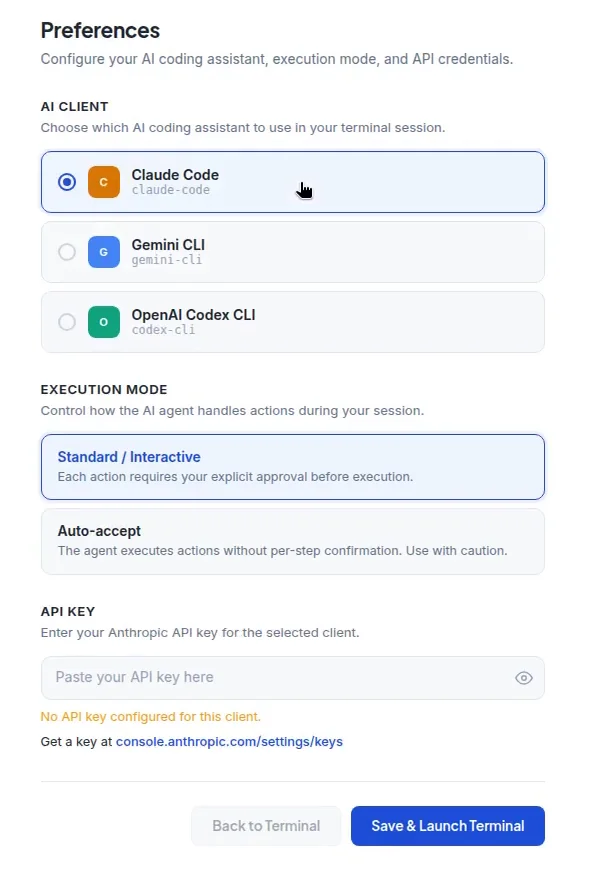
With the other three options, someone on your side still has to know how to upgrade the app, take a backup or read an error log. On Clouve’s AI editions, you ask in plain English and the AI Assistant does the work.
- In standard mode, every action waits for your approval
- You bring your own key from Anthropic, Google or OpenAI
- A flat $100 a month per deployment, included in AI edition prices
See it with your own app
Every listing has a 90-day free trial on X-Small. Or book a call and we’ll talk through your situation.