- Marketplace
- For Businesses
Overview Business software for small teams, schools and nonprofits. Education The Education Kit for schools and colleges. Why Clouve How Clouve compares with your other options. Case study How an education institution moved its LMS and SIS. Trust & Security Hosting, backups, recovery targets and your data. Business docs Guides for running your apps on Clouve.
- For Developers
- Partners
- Insights
- Pricing
- Log in
- Start free trial
Publish your app. Set your price. We keep it running.
Clouve is a marketplace where businesses install apps in a few minutes. You package your app once, starting from the docker-compose.yml you already have. Clouve runs every customer’s copy, bills the customer and pays you what you set per subscriber.
Sell software without becoming a hosting company
Each customer gets their own copy of your app. Clouve runs those copies, and you keep working on the product.
Clouve handles
- Installing and hosting every customer’s deployment
- Web addresses, SSL and monitoring
- Billing the customer each month
- Platform support: installs, uptime, accounts and billing
You handle
- Your app and its new versions
- Your listing: description, category and price
- Questions about how your app works
- App-specific setup help, if your app needs it
Publishing, step by step
A five-step wizard in your dashboard, with nothing Clouve-specific to rewrite. A simple single-container app typically takes a few hours from first login to published.
-
Get developer access
Sign up and request developer access. Your organization gets a private container registry for your images.
-
Describe the listing
The name, a short and a full description, a category, tags, an icon, and who can see it: everyone, only your organization, or only you.
-
Upload your compose file
Clouve reads your docker-compose.yml and gives each service its own tab. You set CPU, memory and storage. Password variables become secrets, generated fresh for every deployment. One switch offers the optional AI Assistant. On a paid plan it comes with a monthly AI usage allowance set by Clouve.
-
Set your price
You set what you earn per subscriber each month. If you offer the AI Assistant, you can also set your own AI Assistant fee, from $0 to $500 a month. Clouve adds the hosting cost for each capacity tier and its own AI Assistant fee, and shows the total the customer pays. Each customer decides whether to add the AI Assistant.
-
Version, review and submit
Give the release a version and a changelog, check the listing as buyers will see it, accept the terms and submit.
-
Review and go live
The Clouve team reviews it. If it needs changes, the feedback appears on your listing. Once approved, it’s published in the marketplace. Updates go through the same flow as new versions.
Who publishes on Clouve
Independent developers
Earn every month a customer stays subscribed, without running a server for each one.
Implementation partners
Package a bundle of apps with your standard setup for the clients you serve. Advising clients more than building apps? See the partner program.
Software studios
Spend your time on the product instead of on each customer’s infrastructure.
What a good listing includes
Buyers decide from the listing alone, so reviews look for these.
- A plain-language overview
- What the app does and who it’s for.
- Setup requirements
- Any settings a buyer needs for the install.
- Data use
- A high-level overview of the data the app stores.
- Support details
- How buyers reach you, and what you cover.
Getting paid
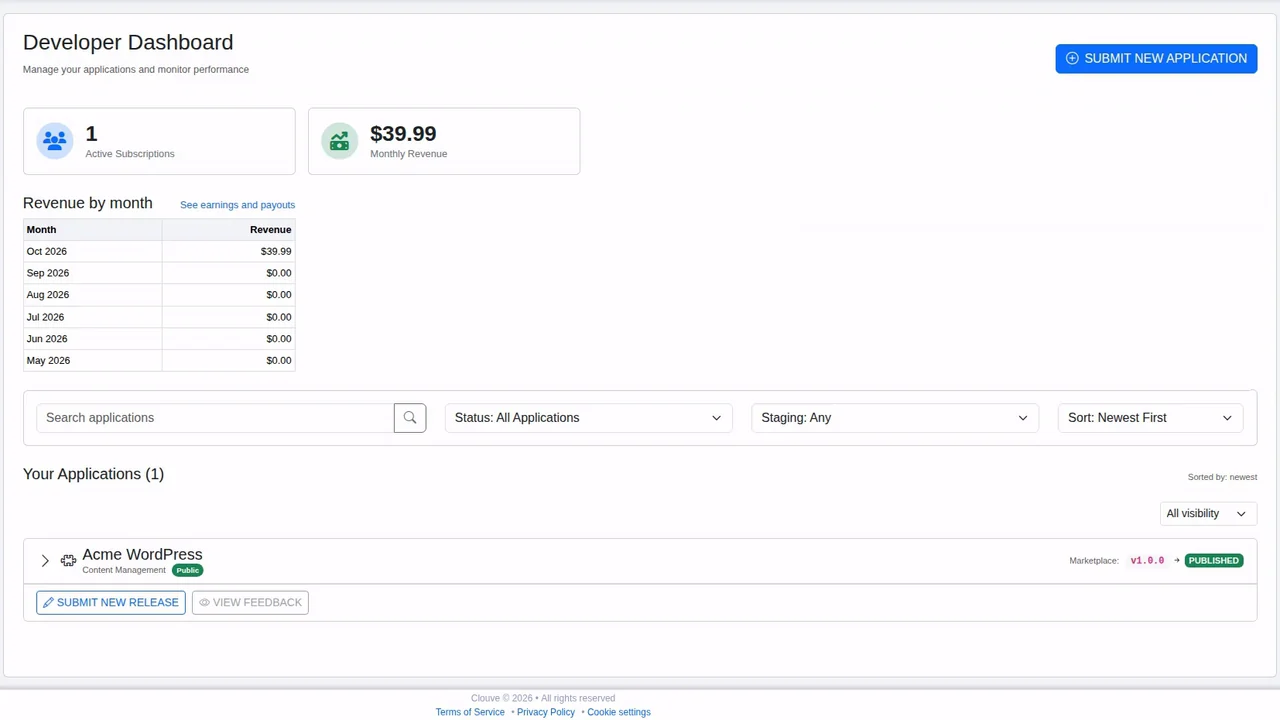
Clouve pays you automatically through PayPal on the 5th of each month. The Earnings page in Clouve shows what you’ll be paid next and where every amount came from, and your developer dashboard shows your active subscriptions and monthly revenue.
Package your app once and sell it to every customer
Sign up, request developer access and start the wizard with the compose file you already have.